PostOffice UK
PostOffice UK
The UK Post Office is a nationwide network offering mail, parcel, banking, and government services. It plays a vital role in supporting communities, especially in rural areas.
The UK Post Office is a nationwide network offering mail, parcel, banking, and government services. It plays a vital role in supporting communities, especially in rural areas.
Role
As a UX designer, it was essential for me to understand the business requirements and apply UX best practices to improve the experience for both customers and counter clerks, who use a device Horizon for their daily operations.
We need to follow the NBIT Library—a design system that outlines all components and guidelines to ensure consistency and efficiency across the platform.
As a UX designer, it was essential for me to understand the business requirements and apply UX best practices to improve the experience for both customers and counter clerks, who use a device Horizon for their daily operations.
We need to follow the NBIT Library—a design system that outlines all components and guidelines to ensure consistency and efficiency across the platform.
Goal
The goal of this case study is to show how I applied core UX principles to solve a common issue faced by counter clerks when entering customer details while handing over parcels at the Post Office.
The goal of this case study is to show how I applied core UX principles to solve a common issue faced by counter clerks when entering customer details while handing over parcels at the Post Office.
Duration
9 months (Overall project), 1 week (detailed ticket)
9 months (Overall project), 1 week (detailed ticket)
During my time at Postoffice, I worked on multiple tickets, but Local Collect one stood out to me. It’s a small yet meaningful task that I genuinely enjoyed solving.
During my time at Postoffice, I worked on multiple tickets, but Local Collect one stood out to me. It’s a small yet meaningful task that I genuinely enjoyed solving.
Below are the details of the tickets I worked on during my time at Post Office UK.
The highlighted ticket is the one featured in this case study.
Below are the details of the tickets I worked on during my time at Post Office UK.
The highlighted ticket is the one featured in this case study.
Below are the details of the tickets I worked on during my time at Post Office UK.
The highlighted ticket is the one featured in this case study.

Problem statement
Simplify the process for counter clerks to fill in customer information when issuing requested items.
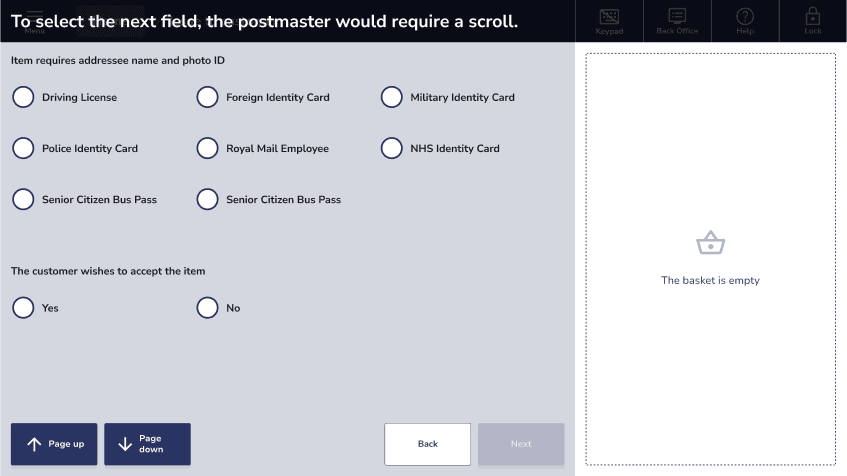
A counter clerk uses the Horizon device to issue items to customers at the Post Office. During this process, the clerk follows several steps and encounters various screens. Upon scanning the barcode the customer brings, a list of questions appears that the clerk needs to ask the customer. This adds to screen scrolling and, with each additional click, increases the clerk's effort, especially when performed multiple times.
A counter clerk uses the Horizon device to issue items to customers at the Post Office. During this process, the clerk follows several steps and encounters various screens. Upon scanning the barcode the customer brings, a list of questions appears that the clerk needs to ask the customer. This adds to screen scrolling and, with each additional click, increases the clerk's effort, especially when performed multiple times.
Metrics
Time to task
Time to task
10 min (approx.)
10 min (approx.)
10 min (approx.)
Clicks
Clicks
6-8
6-8
6-8
Note - You can find the Impact Metrics (result) at the end of case study
Note - You can find the Impact Metrics (result) at the end of case study
Time to task
10 min (approx.)
10 min (approx.)
Clicks
6-8
6-8
Primary Screens in Focus

Process Step by Step
Customer arrives with receipt – The customer presents a receipt with a QR code containing item details.
Verify address ID proof – The counter clerk asks the customer to submit a valid address ID proof (as required for issuing the item).
Check acceptance – After verifying the ID, the counter clerk asks the customer if they are willing to accept the item (to ensure there are no issues like wrong item, damage, or address mismatch).
Issue item or separate it:
If the customer accepts, the counter clerk hands over the item.
If the customer does not accept, the item is placed in a separate bag labeled as "Items not dispatched."
Customer arrives with receipt – The customer presents a receipt with a QR code containing item details.
Verify address ID proof – The counter clerk asks the customer to submit a valid address ID proof (as required for issuing the item).
Check acceptance – After verifying the ID, the counter clerk asks the customer if they are willing to accept the item (to ensure there are no issues like wrong item, damage, or address mismatch).
Issue item or separate it:
If the customer accepts, the counter clerk hands over the item.
If the customer does not accept, the item is placed in a separate bag labeled as "Items not dispatched."
Let me show you a Walkthrough of the whole process.
Lets think from Counter clerk perspective.
Counter clerks work in high-pressure settings and must complete tasks quickly (2-3 mins), so any confusion can cause delays and frustration.
Counter clerks work in high-pressure settings and must complete tasks quickly (2-3 mins), so any confusion can cause delays and frustration.
So let's try to understand analyse the flow and figure out where can we reduce any chance of confusion.
So let's try to understand analyse the flow and figure out where can we reduce any chance of confusion.
Sequence of questions asked
Item require addressee name and photo ID.
The customer wishes to accept the item.
Select the reason why customer is refusing the item.

Sequence of questions asked
Item require addressee name and photo ID.
The customer wishes to accept the item.
Select the reason why customer is refusing the item.
Sequence of questions asked
Item require addressee name and photo ID.
The customer wishes to accept the item.
Select the reason why customer is refusing the item.
Insights in the flow/screens
Case 1:
If the user first selects an option for Question 1 and clicks "Next,"
Question 2 appears, and the user must select an option from question to continue smoothly through the journey.
Case 1:
If the user first selects an option for Question 1 and clicks "Next,"
Question 2 appears, and the user must select an option from question to continue smoothly through the journey.
Case 2:
If the user first presses the "Page Down" button (before selecting an option for Question 1),
Question 2 appears immediately. The user cannot select options form question 2 as it appears.
The user must:
Select an option for Question 1,
Clicking "Next" doesn't change the screen as question 2 is already visible to the user.
To proceed, the user must also select an option for Question 2, and then press "Next" again to continue the journey.
Case 2:
If the user first presses the "Page Down" button (before selecting an option for Question 1),
Question 2 appears immediately. The user cannot select options form question 2 as it appears.
The user must:
Select an option for Question 1,
Clicking "Next" doesn't change the screen as question 2 is already visible to the user.
To proceed, the user must also select an option for Question 2, and then press "Next" again to continue the journey.
Let's simply it. The user must press 'Next' after selecting an option, but they can also use 'Page Down' to see the next question. This causes confusion, as both actions can lead to the same question and disrupt the flow.
Let's simply it. The user must press 'Next' after selecting an option, but they can also use 'Page Down' to see the next question. This causes confusion, as both actions can lead to the same question and disrupt the flow.
Points to remember
Radio button
Radio button
After the user selects the radio button, they need to press "Next" to continue with the journey.
After the user selects the radio button, they need to press "Next" to continue with the journey.

In journey button
In journey button
Once the user clicks the "In Journey" button, there's no need to press "Next," reducing one step each time. Also it requires less space and does not add to scroll.
Once the user clicks the "In Journey" button, there's no need to press "Next," reducing one step each time. Also it requires less space and does not add to scroll.
Driving License
Driving License
Let's rearrange the questions and rephrase this.
Does the customer wishes to accept the item. (Yes)
Item requires addressee name and photo ID.
Does the customer wishes to accept the item. (No)
Select the reason why customer is refusing the item.


Let's rearrange the questions and rephrase this.
Does the customer wishes to accept the item. (Yes)
Item requires addressee name and photo ID.
Does the customer wishes to accept the item. (No)
Select the reason why customer is refusing the item.
Let's rearrange the questions and rephrase this.
Does the customer wishes to accept the item. (Yes)
Item requires addressee name and photo ID.
Does the customer wishes to accept the item. (No)
Select the reason why customer is refusing the item.
Let's go through the Proposed flow
When the counter clerk begins entering the customer's information, they're prompted with a different type of question this time: "Does the customer wish to accept the item?" This splits the whole process into two main flows—one if the answer is "Yes" and another if the answer is "No."
Reason for having this question first -
The next set of questions will dynamically change based on the user's response, eliminating the need to select "Item requires addressee name and photo ID" in both cases.
This updated flow removes the need for scrolling and takes up significantly less space compared to the previous design.
we've replaced the "radio buttons" with an "In Journey" button in both cases to streamline the process and eliminate the extra step of clicking "Next" each time.
When the counter clerk begins entering the customer's information, they're prompted with a different type of question this time: "Does the customer wish to accept the item?" This splits the whole process into two main flows—one if the answer is "Yes" and another if the answer is "No."
Reason for having this question first -
The next set of questions will dynamically change based on the user's response, eliminating the need to select "Item requires addressee name and photo ID" in both cases.
This updated flow removes the need for scrolling and takes up significantly less space compared to the previous design.
we've replaced the "radio buttons" with an "In Journey" button in both cases to streamline the process and eliminate the extra step of clicking "Next" each time.
Case 1: If the user says "Yes"
If the user selects "Yes," they will be prompted to provide ID proof. Once a valid ID is submitted, the item will be ready for collection, and the journey will be complete
Case 1: If the user says "Yes"
If the user selects "Yes," they will be prompted to provide ID proof. Once a valid ID is submitted, the item will be ready for collection, and the journey will be complete
Case 2: If the user says "No"
If the user selects "No," they will be prompted to provide a reason for not collecting the item. Based on their response, the item will be moved to a separate bag, and the task will be completed.
Case 2: If the user says "No"
If the user selects "No," they will be prompted to provide a reason for not collecting the item. Based on their response, the item will be moved to a separate bag, and the task will be completed.
Handing over the item for collection can now be completed with just two clicks for both the cases.
Handing over the item for collection can now be completed with just two clicks for both the cases.
Metrics Achieved
Time to task
Time to task
3-4 min (approx.)
3-4 min (approx.)
3-4 min (approx.)
3-4 min (approx.)
Clicks
Clicks
2-4
2-4
2-4
2-4
Succesfully achieved 70% reduction in query times to streamline parcel issuance.
Succesfully achieved 70% reduction in query times to streamline parcel issuance.
Succesfully achieved 70% reduction in query times to streamline parcel issuance.
Contact
Let's start creating together
ujjwal.design23@gmail.com
Copied
2026 Ujjwal Kumar Singh I Portfolio I All rights reserved
Contact
Let's start creating together
ujjwal.design23@gmail.com
Copied
2026 Ujjwal Kumar Singh I Portfolio I All rights reserved
Contact
Let's start creating together
ujjwal.design23@gmail.com
Copied
2026 Ujjwal Kumar Singh I Portfolio I All rights reserved